Redeem guide
How to Redeem Abyss Roblox Codes from the Settings Code Box
Use these steps to find the code box, paste one source-reported code at a time and rule out tutorial locks before assuming a code is broken.
- 1
Launch Abyss from Roblox and finish the tutorial if this is your first session.
- 2
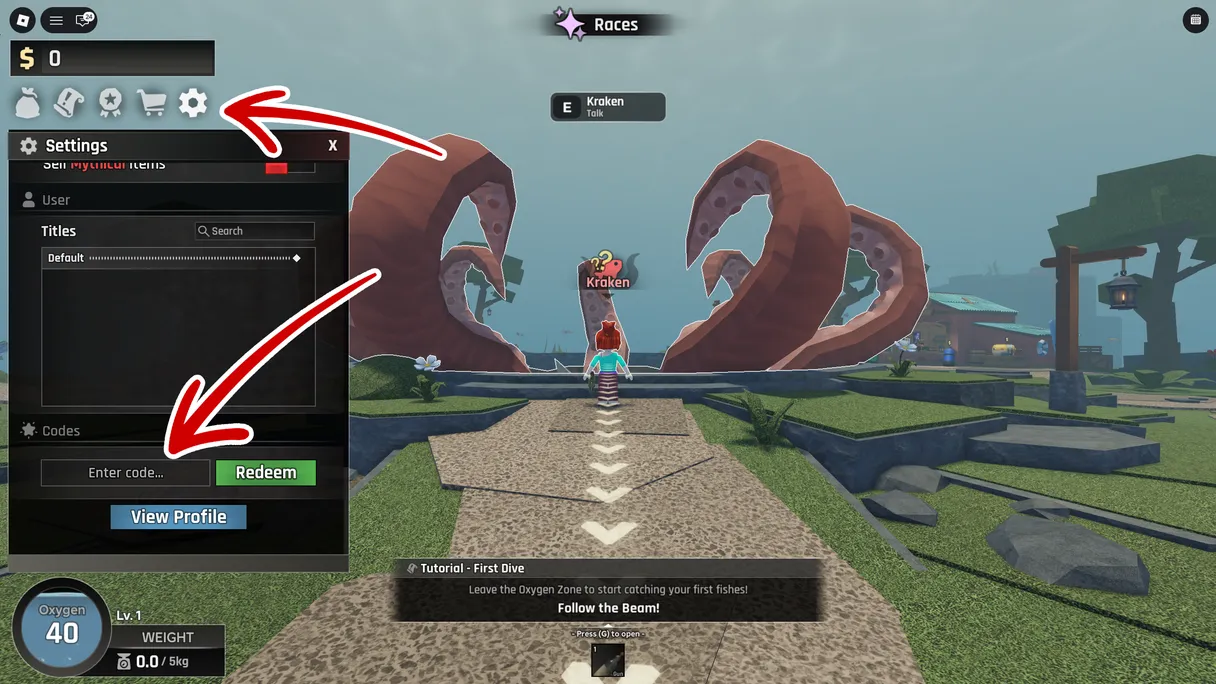
Press the Settings cog on the left side of the game UI.
- 3
Scroll or look near the bottom of Settings for the Enter Code input.
- 4
Paste a code exactly as shown on /codes and press Redeem.
- 5
If nothing happens, test another source-reported code before checking the expired archive.
Common fixes
- Use copy and paste. Codes can be case-sensitive.
- Finish the tutorial before opening Settings.
- Try the current source-reported table before testing anything from old videos.
- Expired codes are kept only so players understand why old videos fail.

Abyss code redemption video guide
Why redemption fails
Tutorial lock
The most common issue is not the code itself. New accounts often cannot see the code box until the tutorial tasks are complete. Finish the starting loop, return to the hub, then open Settings again.
Expired or copied from an old video
Abyss code videos can stay visible long after an event ends. If an old code fails, check the source-reported table first, then use the expired archive to confirm whether the claim is outdated.
Typing mistakes
Use the copy button whenever possible. Promo codes often fail because of extra spaces, missing letters or capitalization differences. Pasting one code at a time is the fastest way to diagnose the problem.
Already redeemed
Most Roblox promo codes can only be used once per account. If a reported code fails on your main account, test whether you already claimed it before assuming the whole list is outdated.