How to Redeem Codes in Roblox Abyss - Step by Step Guide
Redeeming Abyss codes is simple once you know the one requirement: finish the tutorial first. This guide shows the exact steps to redeem codes in Abyss Roblox and the fastest fixes when a Roblox the Abyss code fails.
Before You Redeem - Complete the Tutorial First
Critical Step: Finish the Tutorial First!
You MUST complete the in-game tutorial before you can redeem Abyss codes. The code redemption box is hidden until you finish this requirement.
This is the number one reason Abyss codes do not work for new players. When you first spawn in Roblox Abyss, the Settings menu will not show a code redemption box. It only appears after you complete the tutorial. Here is what you need to do:
- 1.Talk to the Kraken NPC when you first spawn in the game
- 2.Follow the tutorial instructions to grab your first harpoon gun
- 3.Catch three fish using your harpoon (any fish will work)
- 4.Return to the Kraken to finish the tutorial and unlock the Settings menu
Once you finish these steps, the code redemption textbox will appear at the bottom of your Settings menu. Now you are ready to redeem Abyss codes!
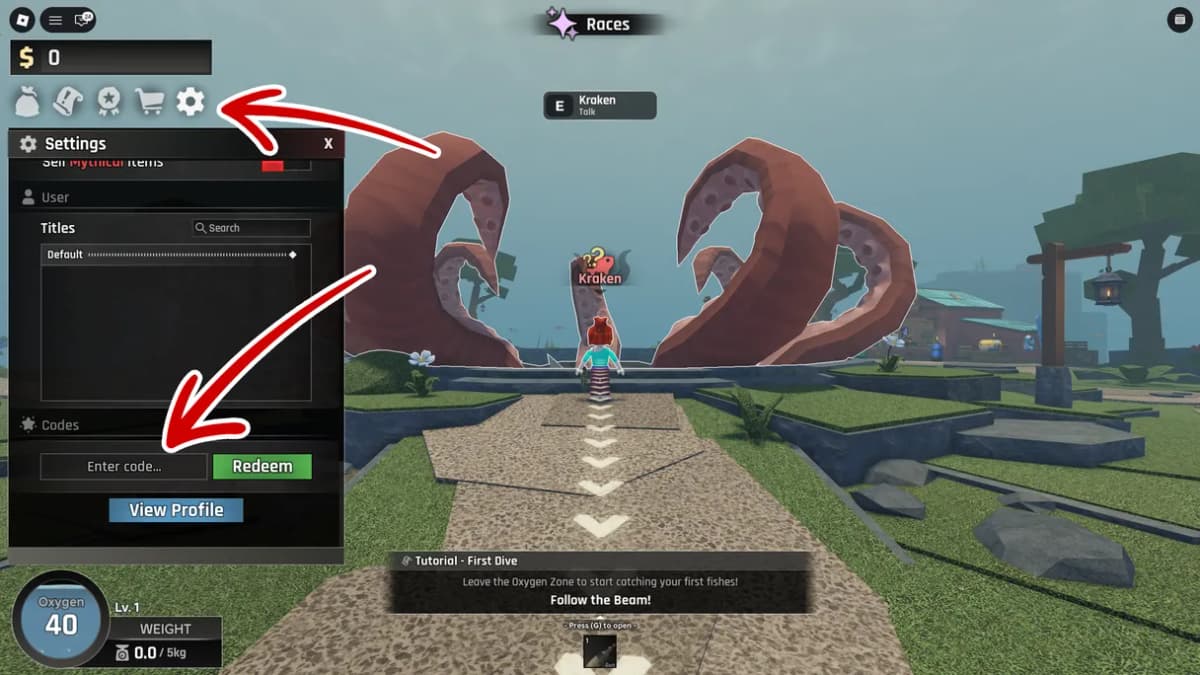
Open Settings (cogwheel icon) and scroll down to find the Codes section with the "Enter code..." textbox and Redeem button.
How to Redeem Abyss Codes - 4 Easy Steps
- 1
Launch Abyss in Roblox
- 2
Press the cogwheel button on the left side of the screen
- 3
Type a code into the 'Enter Code' textbox at the bottom of Settings
- 4
Click Redeem to claim your rewards instantly
That is it! Your rewards will appear in your inventory immediately after you click Redeem. Star Shards are added to your currency balance, potions go to your consumables inventory, and Oxygen Pods are stacked in your equipment menu. If the code does not work, double-check that you completed the tutorial and copied the code exactly as shown.
Redeeming Abyss Codes on Different Platforms
Abyss codes work the same way on every device. The only difference is how you open Settings. Here is the quick breakdown for PC, mobile, and Xbox:
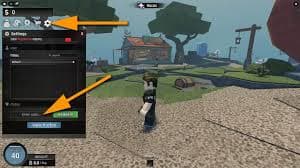
How to Redeem Abyss Codes on PC / Mac
On PC and Mac, open Settings (cogwheel), scroll to the Enter Code box, paste the code exactly, then press Redeem. Copy/paste is safest because Abyss codes are case-sensitive.
How to Redeem Abyss Codes on Mobile (iOS / Android)
On iOS and Android, tap the Settings cogwheel, scroll down, then paste and redeem the code. If typing is hard, use the copy button on the codes page to avoid mistakes.
How to Redeem Abyss Codes on Xbox
On Xbox, open Settings and scroll to the code box. Typing is slower, so use a USB keyboard or the Xbox mobile app if possible, and double-check capitalization before redeeming.
Abyss Codes Not Working? Troubleshooting Guide
If an Abyss code is not working, it is almost always one of a few common issues. Use this checklist to fix code redemption problems fast:
You Did Not Complete the Tutorial
This is the most common issue. The code redemption box is hidden until you talk to the Kraken and catch three fish. Go back and finish the tutorial, then try redeeming Abyss codes again.
Code Already Redeemed
Each Abyss code can only be used once per account. If you already redeemed a code, you cannot claim it again. Check your inventory to see if you already received the rewards earlier.
Case Sensitivity Issues
Abyss codes are case-sensitive. RELEASE, Release, and release are all different codes. Always copy-paste codes exactly as they appear on this site to avoid typos.
Code Expired
Abyss codes do not last forever. Developers remove codes without warning, so redeem them as soon as you see them. This page is updated daily, so any code listed here should work - but if one fails, it might have just expired.
Server Issues or Game Updates
Sometimes Roblox servers are laggy or the Abyss game is updating. If codes are not working for anyone in the community, wait 10-15 minutes and try again. Check the Discord for reports of server downtime.
Internet Connection Problems
Weak internet or lag spikes can prevent codes from redeeming properly. Make sure you have a stable connection, then try redeeming the Abyss code again.
If you tried all these fixes and codes still are not working, check the official Roblox Abyss Discord. Other players will report if a specific code stopped working or if there are widespread server issues.
Current Working Abyss Codes to Redeem
Now that you know how to redeem codes in Abyss, here is a quick reference table of all 3 working codes you can claim right now:
| Code | Rewards |
|---|---|
LOVE | Valentine's Day Reward |
BUGFIX01 | 100x Star Shards, 1x Drop Luck Potion, 1x Speed Potion |
RELEASE | 100x Star Shards, 5x Small Oxygen Pods, 1x Speed Potion |
Tips for Redeeming Roblox Abyss Codes
After redeeming hundreds of codes across different Roblox games, I have learned a few tricks to make the process smoother. Here are my top tips for redeeming Abyss codes efficiently:
Redeem Codes As Soon As They Drop
Abyss codes can expire without warning. When a new code is released on Discord or social media, redeem it immediately. Do not wait - some codes only last a few days.
Bookmark This Page for Daily Updates
I verify Abyss codes every single day and remove expired ones immediately. Bookmark this page and check back regularly to catch new codes the moment they are released by the community.
Join the Discord for Fastest Code Notifications
The Deep Spirit Games Discord server posts Abyss codes in real-time, often hours before they appear on social media or community sites. Join the server and turn on notifications for the codes channel to get instant alerts.
Always Copy-Paste, Never Type Manually
Typing codes by hand leads to mistakes. Use the copy button on the homepage to grab codes with perfect accuracy. This is especially important on mobile and Xbox where typing is slower.
Expert Reviews: Why You Must Claim Your Abyss Codes
Major gaming publications emphasize the importance of understanding how to redeem codes in Abyss Roblox correctly to avoid missing out on limited-time rewards. Here is what industry experts have to say about the code redemption system:
IGN
"Abyss Codes - Abyss [Roblox] Guide"
"Many players get confused because the option to enter Roblox the Abyss codes does not appear immediately. Always remember to complete the initial tutorial with the Kraken NPC before checking your settings menu."
PC Gamer
"All game codes for Abyss February 2026: Potions and Oxygen Pods"
"When looking for all codes in Abyss Roblox, we highly recommend copying and pasting the text directly. The game's case-sensitive input box can be unforgiving on mobile devices."
Where Players Find New Abyss Codes to Redeem
Wondering where all these Abyss codes come from? Deep Spirit Games releases codes through several official channels whenever there are events, updates, or milestones. Here is where the Roblox Abyss community recommends checking for new codes:
Deep Spirit Games Discord Server
The fastest source for new Abyss codes. Developers post codes in the dedicated codes channel the moment they go live. Community members also share codes they discover.
Join Discord for instant code alertsOfficial Roblox Group
Deep Spirit Games posts announcements on their Roblox group page, including new codes during special events, holidays, and game updates.
Social Media (X/Twitter, YouTube)
Follow the developers on social media for announcements. Codes are sometimes shared exclusively on Twitter or revealed in YouTube videos celebrating game milestones.
Community Code Sites (Like This One)
Sites like this aggregate codes from all sources and verify them daily. Bookmark this page to get a centralized list of working Abyss codes without hunting across multiple platforms.
Frequently Asked About Redeeming Abyss Codes
Can I redeem Abyss codes on mobile?
Yes! Abyss codes work on mobile (iOS and Android), PC, Mac, and Xbox. The redemption process is identical across all platforms - just tap the cogwheel icon to open Settings.
Do Abyss codes expire?
Yes, most Abyss codes eventually expire. Deep Spirit Games does not announce expiration dates, so redeem codes as soon as you see them. This page is updated daily to remove expired codes.
Can I redeem the same Abyss code twice?
No. Each Abyss code can only be redeemed once per account. If you try to redeem a code you already used, the game will tell you it has already been redeemed.
Why can't I see the code box in Abyss?
You must complete the tutorial first. Talk to the Kraken NPC and catch three fish. After finishing the tutorial, the code redemption box will appear at the bottom of the Settings menu.